controlling the speed of a fan to cool your Raspberry Pi.
Create a Python file wherever you prefer, for example /home/pi/SFC.py
to do so, open a terminal window and type:
sudo nano /home/pi/SFC.py
Now enter the following in the editor:
#!/usr/bin/pythonimport RPi.GPIO as GPIOimport timeimport os # Return CPU temperature as floatdef getCPUtemp(): cTemp = os.popen('vcgencmd measure_temp').readline() return float(cTemp.replace("temp=","").replace("'C\n",""))GPIO.setmode(GPIO.BCM)GPIO.setup(25,GPIO.OUT)GPIO.setwarnings(False)p=GPIO.PWM(25,100)p.start(100)time.sleep(1)while True: CPU_temp = getCPUtemp() if CPU_temp > 70.0: p.ChangeDutyCycle(100) elif CPU_temp > 60.0: p.ChangeDutyCycle(50) elif CPU_temp > 50.0: p.ChangeDutyCycle(30) elif CPU_temp > 45.0: p.ChangeDutyCycle(25) elif CPU_temp > 40.0: p.ChangeDutyCycle(20) elif CPU_temp > 35.0: p.ChangeDutyCycle(15) elif CPU_temp > 30.0: p.ChangeDutyCycle(10) else: p.ChangeDutyCycle(0) time.sleep(60)p.stop()GPIO.cleanup()
To save the file, press CTRL+O, and to exit the editor press CTRL+X
Next, we need to make this script run at startup on the Raspberry Pi, so type:
sudo nano /etc/rc.local
and add the following line before “exit 0”
su - pi -c "sudo python /home/pi/SFC.py &" &
Connections
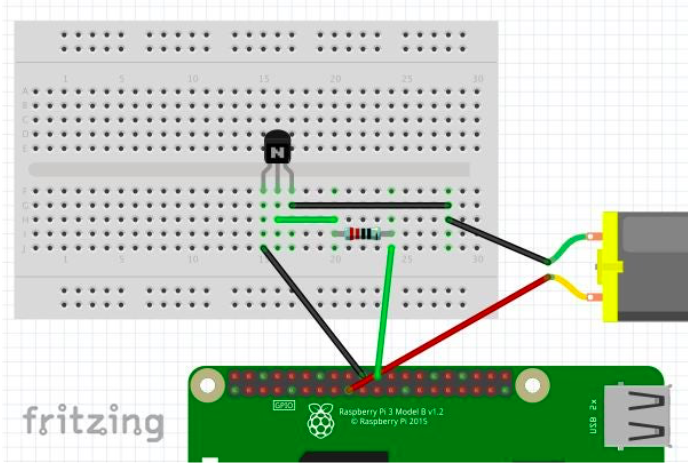
Required components:
- One 2N2222A NPN transistor;
- One 110 Ohm resistor;
- A small 5V fan;
- a breadboard;
- a few jumper cables;
Enjoy!
